
URP RimLit 移植示例(HLSL → GLSL ES 3.00)
一个按 Unity URP 惯例编写的 RimLitUnlit HLSL 着色器,以及它的浏览器 GLSL ES 3.00 移植版本。页面给出完整的参数映射表、无法一致的部分及其原因,并如实标注验证方式。
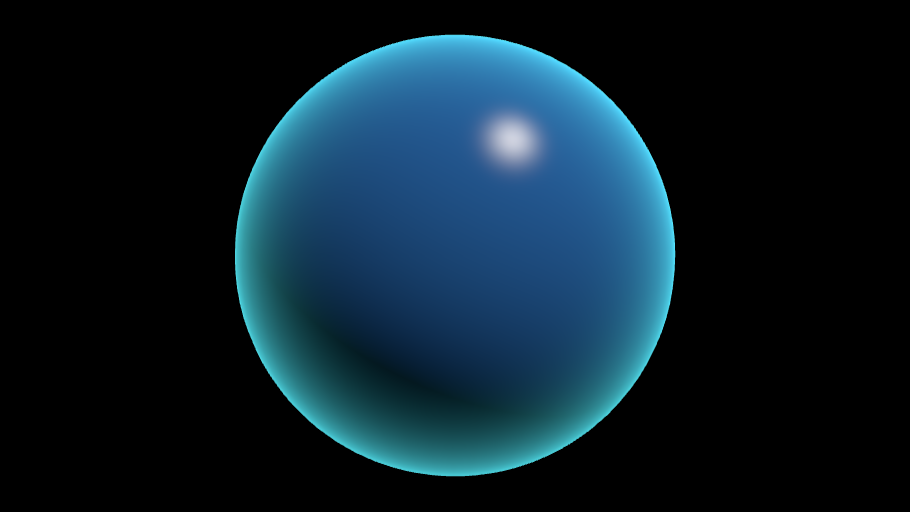
静态预览:实时渲染需要启用 JavaScript 与支持 WebGL 2 的浏览器。初始化成功后会自动切换为实时画面。
实时预览未能启动
已自动切换到上方的静态回退预览。下面是浏览器驱动返回的原始编译日志,可直接用于定位 GLSL 错误。
对应 HLSL 的 _BaseColor。Unity 在线性空间项目中会把调色板的 sRGB 值转换成线性后交给着色器,移植版本做了同样的转换。
uniform uBaseColor
对应 [HDR] _RimColor。浏览器预览不支持 HDR 颜色,超过 1 的分量会被裁剪。
uniform uRimColor
对应 [HDR] _SpecularColor。
uniform uSpecularColor
对应 _AmbientColor。URP 中真实的环境光来自光照探针与 IBL,这里保留为一个常量颜色以便逐像素对照。
uniform uAmbientColor
对应 GetMainLight().color,也就是 URP 每帧写入的 _MainLightColor。
uniform uLightColor
对应 GetMainLight().direction(_MainLightPosition)。URP 由引擎每帧填充,浏览器里只能作为显式 uniform 暴露。
uniform uLightDirection
对应 mainLight.shadowAttenuation。浏览器预览没有阴影贴图,因此它被降级为一个可手动调节的常量。
uniform uShadowAttenuation
对应 _RimPower,Fresnel 项的指数。
uniform uRimPower
对应 _RimIntensity。
uniform uRimIntensity
对应 _RimPulse,控制边缘光随时间脉动的幅度,0 表示关闭。
uniform uRimPulse
对应 _PulseSpeed,与 _Time.y 相乘得到脉动相位。
uniform uPulseSpeed
对应 _Smoothness,通过 exp2(lerp(3, 11, s)) 映射为 Blinn-Phong 指数。
uniform uSmoothness
运行环境与资源诊断
尚未初始化。
HLSL → GLSL 移植记录
未在 Unity 中对照验证 本仓库没有安装 Unity,因此 HLSL 只做了静态审查(属性、CBUFFER、URP 头文件、 光照函数用法),GLSL 版本则在无头 Chromium + SwiftShader 中实际编译、链接并渲染, 由 tests/shader-live.spec.ts 断言出图与参数生效。两者的逐行对照是人工完成的, 没有在 Unity 编辑器中做过并排截图比对。
参数映射表
| Unity URP (HLSL) | 浏览器 (GLSL ES 3.00) | 说明 |
|---|---|---|
| _BaseColor / _RimColor / _SpecularColor / _AmbientColor | uBaseColor / uRimColor / uSpecularColor / uAmbientColor | half4 -> vec3(alpha 在浏览器版本中被固定为 1)。线性空间项目下 Unity 会把 sRGB 调色板值转成线性再上传;移植版本用 THREE.Color.setStyle(hex, SRGBColorSpace) 做同样的事。 |
| _RimPower / _RimIntensity / _RimPulse / _PulseSpeed / _Smoothness | uRimPower / uRimIntensity / uRimPulse / uPulseSpeed / uSmoothness | half -> float,名称与取值范围完全一致。 |
| GetMainLight().direction | uLightDirection | URP 由引擎每帧写入 _MainLightPosition;浏览器没有这份数据,只能作为显式 uniform 暴露给访问者。 |
| GetMainLight().color | uLightColor | 对应 _MainLightColor,同样是引擎填充的。 |
| mainLight.shadowAttenuation | uShadowAttenuation | 浏览器预览没有阴影贴图,也没有 _MAIN_LIGHT_SHADOWS 关键字;降级为可手动调节的常量,默认 1。 |
| _Time.y | uTime | Unity 的 _Time.y 是场景加载以来的秒数且不可暂停;预览使用自己的可暂停时钟,暂停时 uTime 停止推进。 |
| _WorldSpaceCameraPos | cameraPosition | three.js 自动上传同名 uniform,但 RawShaderMaterial 不会自动声明,必须在着色器里手写。 |
| TransformObjectToWorld(positionOS) | (modelMatrix * vec4(position, 1.0)).xyz | 等价。 |
| TransformWorldToHClip(positionWS) | projectionMatrix * modelViewMatrix * vec4(position, 1.0) | three.js 的 modelViewMatrix 已经包含视图矩阵,结果一致。 |
| TransformObjectToWorldNormal(normalOS) | normalize(mat3(modelMatrix) * normal) | URP 用的是模型矩阵逆转置。本页网格缩放恒为 1,两者等价;若引入非均匀缩放需要改成 inverse(transpose(mat3(modelMatrix)))。 |
| RimLitShininess(s) = exp2(lerp(3, 11, saturate(s))) | rimLitShininess(s) = exp2(mix(3.0, 11.0, clamp(s, 0.0, 1.0))) | 逐字对应,saturate -> clamp(x, 0.0, 1.0)。 |
| RimLitFresnel(N, V, p) = pow(1 - saturate(dot(N,V)), max(p, 0.0001)) | rimLitFresnel(N, V, p) | 逐字对应。 |
| return half4(color, _BaseColor.a) // 写入 sRGB framebuffer | fragColor = vec4(linearToSRGB(color), 1.0) | 最重要的差异。Unity 线性工作流由 sRGB framebuffer 在硬件里完成转换;three.js 不会为 RawShaderMaterial 追加任何输出转换,因此必须在片元着色器里显式做 linear -> sRGB。 |
无法完全一致的部分
- 没有阴影。URP 的 TransformWorldToShadowCoord 与 _MAIN_LIGHT_SHADOWS / _SHADOWS_SOFT 关键字在浏览器预览中没有对应物,shadowAttenuation 只能是常量。
- 没有环境光照探针与 IBL。URP 中的 _AmbientColor 实际来自 SampleSH,移植版本用一个常量颜色近似。
- 不支持 HDR 颜色。Unity 的 [HDR] 属性可以给出大于 1 的分量,浏览器的颜色控件只能表达 sRGB 范围内的值。
- half 精度被放宽为 float。移动端 URP 依赖 half 获得性能,GLSL ES 3.00 里虽然也有 highp/mediump,但为了与桌面驱动行为一致,移植版本统一使用 float。
- 没有 SRP Batcher。HLSL 中的 CBUFFER_START(UnityPerMaterial) 是为了兼容 SRP Batcher,浏览器版本用普通 uniform 代替,不影响画面。
- 未在 Unity 中做并排视觉对照,因此“看起来一致”这一条没有被实际验证过。
本页目录
这个示例想说明什么
浏览器不能直接执行 Unity URP 的 HLSL。要在网页上展示一个 URP 效果,只有两条路:把整个工程导出成 Unity WebGL(体积大、加载慢、和静态博客的架构冲突),或者手写一份等价的 GLSL。本站选择第二条,并且坚持一个原则——原始 HLSL 永远保留,移植版本单独存放,两者分开展示,差异写清楚。
原始 HLSL 位于 src/shaders/hlsl/rimlit/,移植后的 GLSL 位于 src/shaders/glsl/rimlit-port.*。上面的「源码」区域会把两者并列出来,浏览器实际编译的只有 GLSL 那一份。
原始 HLSL 的结构
RimLitUnlit.shader 按 URP 的惯例组织:
Properties块声明材质面板上的可编辑属性;SubShader的Tags里写明"RenderPipeline" = "UniversalPipeline",Pass 的LightMode为UniversalForward;HLSLPROGRAM中引入Core.hlsl与Lighting.hlsl,材质属性集中在RimLitUnlitInput.hlsl的CBUFFER_START(UnityPerMaterial)里,以保持 SRP Batcher 兼容;- 顶点阶段使用
TransformObjectToWorld/TransformWorldToHClip/TransformObjectToWorldNormal; - 片元阶段通过
GetMainLight()(在有阴影关键字时用GetMainLight(shadowCoord))取得主光方向、颜色与阴影衰减。
光照模型本身很简单:
其中 , 是 shadowAttenuation, 是 _RimPulse, 是 _PulseSpeed, 是 _Time.y。GLSL 版本使用完全相同的表达式,只是把 saturate 写成 clamp(x, 0.0, 1.0)、lerp 写成 mix、half 写成 float。
移植过程中真正麻烦的三件事
1. 光照数据从哪里来
URP 的 GetMainLight() 读取的是引擎每帧填充的 _MainLightPosition / _MainLightColor / _MainLightOcclusionProbes。浏览器里没有这套数据,three.js 也不会提供。所以移植版本必须把它们提升为显式 uniform,交给页面上的控件——这既是妥协,也顺便让访问者可以直接调光。
2. 法线矩阵的语义差异
three.js 提供的 normalMatrix 是 modelViewMatrix 的逆转置,得到视图空间法线;URP 的 TransformObjectToWorldNormal 得到的是世界空间法线。混用会得到「边缘光跟着相机跑」的错误效果。移植版本用 mat3(modelMatrix) 自己算世界空间法线,并在注释里写明:只有在均匀缩放时它才严格等价于逆转置。
3. 输出颜色空间
这是最容易被忽略、但视觉上最明显的一处。Unity 在线性空间项目里输出线性值,由 sRGB framebuffer 在硬件层面完成编码;three.js 对 RawShaderMaterial 不追加任何输出转换代码。如果 GLSL 版本直接输出线性值,画面会明显偏暗。因此移植版本在片元着色器末尾显式调用 linearToSRGB(),并把 renderer.outputColorSpace 设为 LinearSRGBColorSpace 以表明「转换已经在着色器里做完了」。
验证方式与已知不足
- HLSL:仅静态审查。本仓库没有 Unity 安装,因此没有经过 Unity 的着色器编译器验证,也没有在编辑器里观察过实际效果。这一点在页面顶部的徽标上明确标注为「未在 Unity 中对照验证」。
- GLSL:真实编译并运行。自动化测试(
tests/shader-live.spec.ts)会在无头 Chromium + SwiftShader 中挂载预览,断言状态变为running、画布出现非纯色像素、修改参数改变画面、暂停后时间停止推进。 - 逐行对照:人工完成,结果记录在上面的映射表里。
如果你在自己的 Unity 工程里跑过 RimLitUnlit.shader,欢迎对照本页的参数默认值检查差异;把 porting.verifiedInUnity 改为 true 并补充 verificationNotes 之后,页面徽标会自动变成「已在 Unity 中对照验证」。
源码
浏览器 GLSL 与原始 HLSL 分开存放、分开展示。HLSL 仅作参考,浏览器无法直接执行 Unity URP 的 HLSL。
顶点着色器 rimlit-port.vert glsl GLSL ES 3.00 · 浏览器中实际编译 30 行
three.js 会自动在最前面加入 `#version 300 es`,因此源文件本身不包含该指令。
// Browser port of RimLitUnlit.shader (Unity URP / HLSL) - vertex stage.
//
// URP                                  ->  GLSL ES 3.00
// TransformObjectToWorld(positionOS)   ->  (modelMatrix * vec4(position, 1.0)).xyz
// TransformWorldToHClip(positionWS)    ->  projectionMatrix * modelViewMatrix * vec4(position, 1.0)
// TransformObjectToWorldNormal(normal) ->  normalize(mat3(modelMatrix) * normal)
//
// NOTE: `#version 300 es` is injected by three.js (RawShaderMaterial + GLSL3).

precision highp float;

uniform mat4 modelMatrix;
uniform mat4 modelViewMatrix;
uniform mat4 projectionMatrix;

in vec3 position;   // Attributes.positionOS
in vec3 normal;     // Attributes.normalOS
in vec2 uv;         // Attributes.uv

out vec3 vPositionWS;   // Varyings.positionWS
out vec3 vNormalWS;     // Varyings.normalWS
out vec2 vUv;

void main() {
  vec4 worldPosition = modelMatrix * vec4(position, 1.0);
  vPositionWS = worldPosition.xyz;
  vNormalWS = normalize(mat3(modelMatrix) * normal);
  vUv = uv;
  gl_Position = projectionMatrix * modelViewMatrix * vec4(position, 1.0);
}
片元着色器 rimlit-port.frag glsl GLSL ES 3.00 · 浏览器中实际编译 83 行
// Browser port of RimLitUnlit.shader (Unity URP / HLSL) - fragment stage.
//
// Mapping summary (the full table lives in src/content/shaders/urp-rimlit-port.md):
//   GetMainLight().direction / .color  -> uLightDirection / uLightColor
//   mainLight.shadowAttenuation        -> uShadowAttenuation (exposed as a
//                                         constant: the browser preview has no
//                                         shadow map and no URP light data)
//   _Time.y                            -> uTime (pausable preview clock)
//   _WorldSpaceCameraPos               -> cameraPosition (provided by three.js)
//   half4 color : SV_Target            -> fragColor, plus an explicit
//                                         linear -> sRGB encode, because URP
//                                         relies on an sRGB framebuffer while
//                                         three.js adds no conversion for
//                                         RawShaderMaterial.
//
// NOTE: `#version 300 es` is injected by three.js (RawShaderMaterial + GLSL3).

precision highp float;

in vec3 vPositionWS;
in vec3 vNormalWS;
in vec2 vUv;

uniform vec3  cameraPosition;     // == _WorldSpaceCameraPos
uniform float uTime;              // == _Time.y
uniform vec3  uBaseColor;         // == _BaseColor.rgb      (linear)
uniform vec3  uRimColor;          // == _RimColor.rgb       (linear)
uniform vec3  uSpecularColor;     // == _SpecularColor.rgb  (linear)
uniform vec3  uAmbientColor;      // == _AmbientColor.rgb   (linear)
uniform vec3  uLightColor;        // == GetMainLight().color
uniform vec3  uLightDirection;    // == GetMainLight().direction
uniform float uShadowAttenuation; // == mainLight.shadowAttenuation
uniform float uRimPower;          // == _RimPower
uniform float uRimIntensity;      // == _RimIntensity
uniform float uRimPulse;          // == _RimPulse
uniform float uPulseSpeed;        // == _PulseSpeed
uniform float uSmoothness;        // == _Smoothness

out vec4 fragColor;

vec3 linearToSRGB(vec3 c) {
  vec3 lo = c * 12.92;
  vec3 hi = 1.055 * pow(max(c, vec3(0.0)), vec3(1.0 / 2.4)) - 0.055;
  return mix(lo, hi, step(vec3(0.0031308), c));
}

// half RimLitShininess(half smoothness)
float rimLitShininess(float smoothness) {
  return exp2(mix(3.0, 11.0, clamp(smoothness, 0.0, 1.0)));
}

// half RimLitFresnel(half3 N, half3 V, half rimPower)
float rimLitFresnel(vec3 N, vec3 V, float rimPower) {
  float cosTheta = clamp(dot(N, V), 0.0, 1.0);
  return pow(1.0 - cosTheta, max(rimPower, 0.0001));
}

void main() {
  vec3 N = normalize(vNormalWS);
  vec3 V = normalize(cameraPosition - vPositionWS);
  vec3 L = normalize(uLightDirection);
  float shadowAtten = clamp(uShadowAttenuation, 0.0, 1.0);

  // half ndotl = saturate(dot(N, L)) * shadowAtten;
  float ndotl = clamp(dot(N, L), 0.0, 1.0) * shadowAtten;
  vec3 diffuse = uBaseColor * uLightColor * ndotl;

  // Blinn-Phong specular.
  vec3 H = normalize(L + V);
  float shininess = rimLitShininess(uSmoothness);
  float ndoth = pow(clamp(dot(N, H), 0.0, 1.0), shininess);
  vec3 specular = uSpecularColor * uLightColor * ndoth * clamp(uSmoothness, 0.0, 1.0);

  // Fresnel rim, optionally pulsing with time.
  float fresnel = rimLitFresnel(N, V, uRimPower);
  float pulse = 1.0 + uRimPulse * sin(uTime * uPulseSpeed);
  vec3 rim = uRimColor * fresnel * uRimIntensity * pulse;

  vec3 ambient = uBaseColor * uAmbientColor;
  vec3 color = ambient + diffuse + specular + rim;

  fragColor = vec4(linearToSRGB(clamp(color, 0.0, 1.0)), 1.0);
}
ShaderLab + HLSLPROGRAM 主体 rimlit/RimLitUnlit.shader hlsl 原始 HLSL · 不在浏览器中执行 133 行
// ---------------------------------------------------------------------------
// Portfolio/RimLitUnlit
//
// Unity URP forward-lit shader: Lambert diffuse + Blinn-Phong specular from the
// main light, plus a Fresnel rim term that can pulse over time.
//
// This is the ORIGINAL HLSL source. The browser cannot execute it; the GLSL ES
// 3.00 port used for the live preview is src/shaders/glsl/rimlit-port.vert and
// src/shaders/glsl/rimlit-port.frag, and the full mapping table plus the list
// of differences is in src/content/shaders/urp-rimlit-port.md.
//
// Verified with: static review only. See "verificationNotes" in the content
// entry - this repository has no Unity installation, so the shader has NOT
// been compiled or visually compared inside the Unity editor.
// ---------------------------------------------------------------------------
Shader "Portfolio/RimLitUnlit"
{
    Properties
    {
        [MainColor] _BaseColor("Base Color", Color) = (0.16, 0.42, 0.75, 1)
        [HDR] _RimColor("Rim Color", Color) = (0.35, 0.95, 1.00, 1)
        _RimPower("Rim Power", Range(0.25, 12)) = 3.0
        _RimIntensity("Rim Intensity", Range(0, 4)) = 1.2
        _RimPulse("Rim Pulse Amount", Range(0, 1)) = 0.0
        _PulseSpeed("Pulse Speed", Range(0, 6)) = 1.5
        _Smoothness("Smoothness", Range(0, 1)) = 0.6
        [HDR] _SpecularColor("Specular Color", Color) = (1, 1, 1, 1)
        _AmbientColor("Ambient Color", Color) = (0.06, 0.07, 0.09, 1)
    }

    SubShader
    {
        Tags
        {
            "RenderType" = "Opaque"
            "RenderPipeline" = "UniversalPipeline"
            "Queue" = "Geometry"
            "IgnoreProjector" = "True"
        }
        LOD 100

        Pass
        {
            Name "ForwardLit"
            Tags { "LightMode" = "UniversalForward" }

            HLSLPROGRAM
            #pragma vertex rimlitVert
            #pragma fragment rimlitFrag
            #pragma target 3.5

            // URP shadow keywords. The browser port has no shadow map, so it
            // always behaves like shadowAttenuation == 1 (documented as a
            // limitation of the port).
            #pragma multi_compile _ _MAIN_LIGHT_SHADOWS _MAIN_LIGHT_SHADOWS_CASCADE
            #pragma multi_compile_fragment _ _SHADOWS_SOFT

            #include "Packages/com.unity.render-pipelines.universal/ShaderLibrary/Core.hlsl"
            #include "Packages/com.unity.render-pipelines.universal/ShaderLibrary/Lighting.hlsl"
            #include "RimLitUnlitInput.hlsl"

            struct Attributes
            {
                float4 positionOS : POSITION;
                float3 normalOS   : NORMAL;
                float2 uv         : TEXCOORD0;
            };

            struct Varyings
            {
                float4 positionCS : SV_POSITION;
                float3 positionWS : TEXCOORD0;
                float3 normalWS   : TEXCOORD1;
            };

            Varyings rimlitVert(Attributes IN)
            {
                Varyings OUT;
                OUT.positionWS = TransformObjectToWorld(IN.positionOS.xyz);
                OUT.positionCS = TransformWorldToHClip(OUT.positionWS);
                OUT.normalWS   = TransformObjectToWorldNormal(IN.normalOS);
                return OUT;
            }

            half4 rimlitFrag(Varyings IN) : SV_Target
            {
                float3 N = normalize(IN.normalWS);
                float3 V = normalize(_WorldSpaceCameraPos - IN.positionWS);

            #if defined(_MAIN_LIGHT_SHADOWS) || defined(_MAIN_LIGHT_SHADOWS_CASCADE)
                float4 shadowCoord = TransformWorldToShadowCoord(IN.positionWS);
                Light mainLight = GetMainLight(shadowCoord);
            #else
                Light mainLight = GetMainLight();
            #endif

                float3 L = normalize(mainLight.direction);
                half3  lightColor = mainLight.color;
                half   shadowAtten = mainLight.shadowAttenuation;

                // Lambert diffuse.
                half ndotl = saturate(dot(N, L)) * shadowAtten;
                half3 diffuse = _BaseColor.rgb * lightColor * ndotl;

                // Blinn-Phong specular.
                half3 H = normalize(L + V);
                half shininess = RimLitShininess(_Smoothness);
                half ndoth = pow(saturate(dot(N, H)), shininess);
                half3 specular = _SpecularColor.rgb * lightColor * ndoth * saturate(_Smoothness);

                // Fresnel rim, optionally pulsing with _Time.y.
                half fresnel = RimLitFresnel(N, V, _RimPower);
                half pulse = 1.0h + _RimPulse * sin(_Time.y * _PulseSpeed);
                half3 rim = _RimColor.rgb * fresnel * _RimIntensity * pulse;

                half3 ambient = _BaseColor.rgb * _AmbientColor.rgb;

                // In a linear-colour-space project Unity converts the sRGB
                // values from the colour picker to linear before they reach
                // this shader, and converts the result back to sRGB when
                // writing to the framebuffer. Neither conversion appears here.
                half3 color = ambient + diffuse + specular + rim;
                return half4(color, _BaseColor.a);
            }
            ENDHLSL
        }

        // ShadowCaster / DepthOnly / DepthNormalsOnly passes are intentionally
        // omitted from this reference implementation.
    }

    FallBack "Universal Render Pipeline/Unlit"
}
材质属性 CBUFFER 与工具函数 rimlit/RimLitUnlitInput.hlsl hlsl 原始 HLSL · 不在浏览器中执行 42 行
#ifndef RIMLIT_UNLIT_INPUT_INCLUDED
#define RIMLIT_UNLIT_INPUT_INCLUDED

// ---------------------------------------------------------------------------
// Portfolio/RimLitUnlit - material property declarations.
//
// Unity URP (HLSL). This file is the ORIGINAL source and is never compiled by
// the browser. The GLSL ES 3.00 port lives in src/shaders/glsl/rimlit-port.*.
//
// The whole material must sit inside one CBUFFER named UnityPerMaterial so the
// shader stays SRP-Batcher compatible.
// ---------------------------------------------------------------------------

#include "Packages/com.unity.render-pipelines.core/ShaderLibrary/CommonMaterial.hlsl"

CBUFFER_START(UnityPerMaterial)
    half4 _BaseColor;
    half4 _RimColor;
    half4 _SpecularColor;
    half4 _AmbientColor;
    half  _RimPower;
    half  _RimIntensity;
    half  _RimPulse;
    half  _PulseSpeed;
    half  _Smoothness;
CBUFFER_END

// Perceptual smoothness -> Blinn-Phong exponent. Both sides of the port use
// this exact expression, which is what makes the specular highlight match.
half RimLitShininess(half smoothness)
{
    return exp2(lerp(3.0h, 11.0h, saturate(smoothness)));
}

// Schlick-style rim term: pow(1 - saturate(N dot V), power).
half RimLitFresnel(half3 N, half3 V, half rimPower)
{
    half cosTheta = saturate(dot(N, V));
    return pow(1.0h - cosTheta, max(rimPower, 0.0001h));
}

#endif // RIMLIT_UNLIT_INPUT_INCLUDED